Zero-Latency Plugin Addresses Pre-Echo Issues in Traditional Room Correction
MathAudio has released an updated version of Room EQ, a room acoustic correction plugin that aims to solve pre-echo problems common in convolver-based correction systems. The plugin supports multiple formats including VST, VST3, CLAP, and AU, with specialized integration for Foobar2000.
Patented Correction Technology
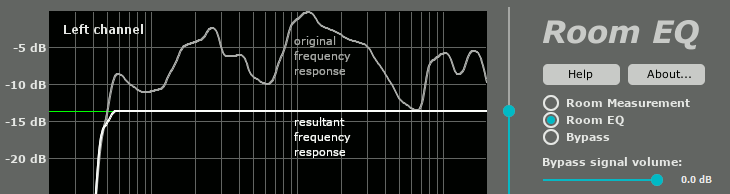
Room EQ employs what MathAudio describes as a patented frequency response correction method that performs frequency, phase, and time domain correction without introducing pre-echo artifacts. The system works with zero latency, making it suitable for live performances, studio monitoring, and video playback without audio delay.
The plugin addresses resonance peaks while preserving deep notches in the frequency response, avoiding overcompensation issues that MathAudio states are common in conventional linearizing room correction systems.
Multi-Point Measurement System
The correction process uses multiple measurement points distributed throughout the listening area to create composite frequency response data. Users typically perform 5-10 measurements using either USB measurement microphones like the MiniDSP UMIK-1 or conventional measurement microphones such as the Dayton Audio EMM-6.
The plugin supports microphone calibration files and includes automatic scaling for 4K monitors plus manual window resizing. Sample rates from 44,056 kHz to 384 kHz are supported without resampling to maintain audio quality.
Adjustable Compensation Control
A key feature is the manually adjustable compensation level, allowing users to control the degree of correction applied. This approach enables finding optimal transparency by adjusting how much of the room's resonant peaks are reduced while maintaining the acoustic character.
The plugin includes reference curve options with "Bright" for flat response and "Neutral" for high-frequency roll-off. Users can also draw custom target curves using mouse control within the frequency response windows.
Professional Integration Features
Room EQ includes stereo balance adjustment with fine control via mouse wheel and double-click reset functionality. A gain control system prevents clipping while managing output levels that may exceed 0 dB during correction.
The plugin operates with a 64-bit signal path throughout and can function as a conventional drawing EQ when needed, providing flexibility for different correction approaches.
Comprehensive Tutorial and Support
MathAudio provides detailed step-by-step instructions covering measurement setup, microphone placement, correction parameter adjustment, and comparison testing between processed and original signals. The system includes bypass functionality for A/B testing with level-matched comparisons.
More information and downloads are available on the MathAudio website.